
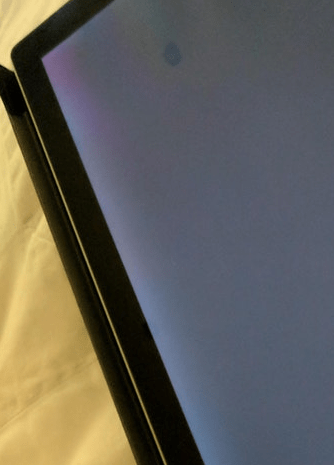
Backlight Bleed

Backlight bleed is one of those issues that sits in a grey area between “normal LCD behaviour” and “this shouldn’t happen on a premium device.” If you’ve deployed, supported, or personally owned Microsoft Surface devices—particularly the Surface Pro line—you’ve likely encountered it.

As an IT professional, what makes backlight bleed especially frustrating isn’t just the visual distraction, but the inconsistent messaging from vendors, the subjective nature of acceptability, and the fact that Surface devices are often positioned as creator-grade, premium hardware.

This article breaks down:

  • What backlight bleed actually is (and isn’t)
  • Why Surface devices are particularly prone to it
  • How to properly test for it
  • When it’s considered “normal”
  • When it crosses into hardware defect territory
  • Why there is no real fix—and what your realistic options are

This isn’t a consumer rant. It’s a practical, experience-driven analysis for IT professionals making purchasing, support, and warranty decisions.


What Is Backlight Bleed?

Backlight bleed is an LCD display artifact where light from the panel’s backlight leaks through areas that should be fully sealed—typically around the edges or corners of the screen.

In a perfect LCD:

  • The backlight is evenly diffused
  • The liquid crystal layer blocks light precisely
  • The panel housing applies uniform pressure

In reality, manufacturing tolerances, pressure points, and panel bonding inconsistencies allow light to escape where it shouldn’t.

The result:

  • Bright patches along edges
  • Uneven illumination on dark backgrounds
  • Visible glow in low-light environments

Backlight Bleed

Backlight Bleed vs IPS Glow (Important Distinction)

These two terms are often confused—even by vendors.

Backlight Bleed

  • Appears along edges or specific pressure points
  • Usually static and does not change with viewing angle
  • Caused by panel assembly or chassis pressure

IPS Glow

  • Appears more in corners
  • Changes intensity depending on viewing angle
  • Inherent to IPS panel technology

Key takeaway:
Backlight bleed is a manufacturing or assembly issue. IPS glow is a panel technology limitation.

Surface devices often suffer from both, which compounds the visual effect.


Why Microsoft Surface Devices Are Prone to Backlight Bleed

From a hardware design perspective, Surface devices combine several risk factors:

1. Ultra-Thin Chassis Design

Surface displays are extremely thin, leaving:

  • Minimal room for backlight diffusion
  • Less tolerance for pressure variance
  • Greater risk of uneven panel seating

2. High-Resolution Panels

Higher pixel density panels amplify uneven light distribution, making bleed more noticeable—especially on dark or grey backgrounds.

3. Magnesium Alloy Frames

The rigid chassis doesn’t flex well. Even slight manufacturing variances can cause pressure hotspots along the display edges.

4. Tight Manufacturing Tolerances

Ironically, premium design goals can increase defect visibility rather than reduce it.

In large Surface deployments, it’s not uncommon to see:

  • Some units flawless
  • Others clearly affected
  • No consistency even within the same batch

How to Properly Test for Backlight Bleed (The Right Way)

Testing incorrectly can exaggerate the issue—or miss it entirely.

Recommended Test Method

  1. Set screen brightness to 70–80%
  2. Display a pure black or dark grey background
  3. Test in a dimly lit room
  4. View the screen head-on, not at an angle
  5. Observe for:
    • Edge light leakage
    • Uneven brightness
    • Static bright patches

Avoid:

  • Maximum brightness testing (unrealistic use case)
  • Pitch-black rooms (exaggerates perception)
  • Off-angle viewing (introduces IPS glow confusion)

Real-World Impact: Does It Actually Matter?

From an IT operations standpoint, the impact varies dramatically depending on use case.

Where It’s Barely Noticeable

  • Office productivity
  • Web browsing
  • Email
  • Brightly lit environments

Where It’s a Genuine Problem

  • Photo and video editing
  • Graphic design
  • Dark-mode applications
  • Media consumption
  • Low-light environments
  • Gaming

For creators and technical professionals, backlight bleed undermines:

  • Colour accuracy
  • Contrast perception
  • Premium device expectations

This is especially problematic given Microsoft’s marketing of Surface devices as creative and professional tools.


Microsoft’s Warranty Position: The Uncomfortable Reality

Here’s where theory meets frustration.

Microsoft has historically taken the position that:

“Some level of backlight bleed is normal and expected.”

And technically—they’re not wrong.

However, normal does not mean acceptable, especially on devices commanding premium pricing.

What Typically Happens

  • Within 30 days of purchase:
    Replacement is often approved, especially if the issue is obvious.
  • After 30 days:
    Outcomes vary wildly depending on:
    • Severity
    • Support agent
    • Region
    • Persistence

Some users report being told:

“All Surface devices have this issue.”

From an IT professional’s perspective, this response is unacceptable, particularly for enterprise or creative deployments.


Why There Is No Fix for Backlight Bleed

This is the hard truth:

Backlight bleed cannot be fixed with software, firmware, or calibration.

No driver update, colour profile, or OS tweak can resolve it because:

  • The issue exists at the physical panel level
  • It’s caused by pressure, bonding, or diffusion inconsistencies

Attempts such as:

  • Reducing brightness
  • Changing colour profiles
  • Adjusting contrast

…only mask the symptom—not the cause.


Can Backlight Bleed Get Worse Over Time?

In some cases, yes.

Factors include:

  • Thermal expansion and contraction
  • Chassis flex during transport
  • Prolonged heat exposure

I’ve personally seen Surface devices where:

  • Minor bleed became more pronounced after 12–18 months
  • Edge hotspots expanded slightly over time

This is another reason early replacement is critical if the issue is noticeable.


Is Some Backlight Bleed Acceptable?

From a purely technical standpoint:

  • Yes, minor bleed exists in most LCDs

From a premium product expectation standpoint:

  • Minimal bleed should be the baseline
  • Obvious patches on dark backgrounds are not acceptable

For IT procurement teams, this becomes a risk management issue:

  • Inconsistent quality
  • Time spent on RMAs
  • End-user dissatisfaction

Practical Advice for IT Professionals

If You’re Buying Surface Devices

  • Inspect displays immediately upon delivery
  • Test in controlled lighting
  • Don’t delay replacements

If You’re Supporting End Users

  • Set expectations early
  • Document display defects
  • Push for replacement within return windows

If You’re a Power User or Creator

  • Decide your tolerance level early
  • Exchange aggressively if needed
  • Don’t assume “it will get better”

Final Verdict: A Premium Price Demands Premium Quality

Backlight bleed on Microsoft Surface devices isn’t a myth—it’s a well-documented, recurring issue tied to design and manufacturing realities.

While some level of imperfection is inevitable with LCD technology, the visibility and frequency of backlight bleed on certain Surface models undermines Microsoft’s premium positioning.

For a device marketed toward professionals, creators, and enterprises, quality control should be tighter—and customer responses more consistent.

Backlight bleed may not break functionality, but it erodes trust, and that’s far harder to fix than a display panel.

Related Content – How To Avoid Screen Burn

Leave a Reply

Your email address will not be published. Required fields are marked *